> For the complete documentation index, see [llms.txt](https://docs.yieldbay.fi/llms.txt). Markdown versions of documentation pages are available by appending `.md` to page URLs; this page is available as [Markdown](https://docs.yieldbay.fi/using-yieldbay/getting-started.md).
# Getting Started
#### Step 1: Open Yieldbay
Go to:\
[**https://app.yieldbay.fi**](https://app.yieldbay.fi)
This is the main application where you can connect your wallet and view your portfolio.
***
#### Step 2: Connect Your Wallet
Click **Connect Wallet** and select your preferred Solana wallet.
Yieldbay only requests **read-only access** to public on-chain data.\
No transactions are signed at this stage.
Supported wallets include:
* Phantom
* Solflare
* Backpack
* Other standard Solana wallets
***
#### Step 3: Index Your Positions
Once your wallet is connected, Yieldbay will automatically **index your existing on-chain positions** across supported Solana DeFi protocols.
This may include:
* Liquidity positions
* Lending or borrowing positions
* Vaults and other yield strategies
Indexing allows Yieldbay to build a **portfolio-level overview** of your activity.
***
#### Step 4: View the Dashboard
After indexing completes, you’ll be taken to the **Dashboard**.
The dashboard shows:
* All indexed positions in one view
* Protocol-level breakdowns
* Yield exposure across strategies
***
#### Step 5: Re-evaluate Your Portfolio
On-chain data changes over time as:
* Rewards accrue
* Rates shift
* Positions rebalance
Click **Re-evaluate** to refresh your portfolio data and sync it with the latest on-chain state.
Re-evaluating:
* Does **not** move funds
* Does **not** execute transactions
* Only updates displayed data
***
### Step 6: Open the Optimization Panel
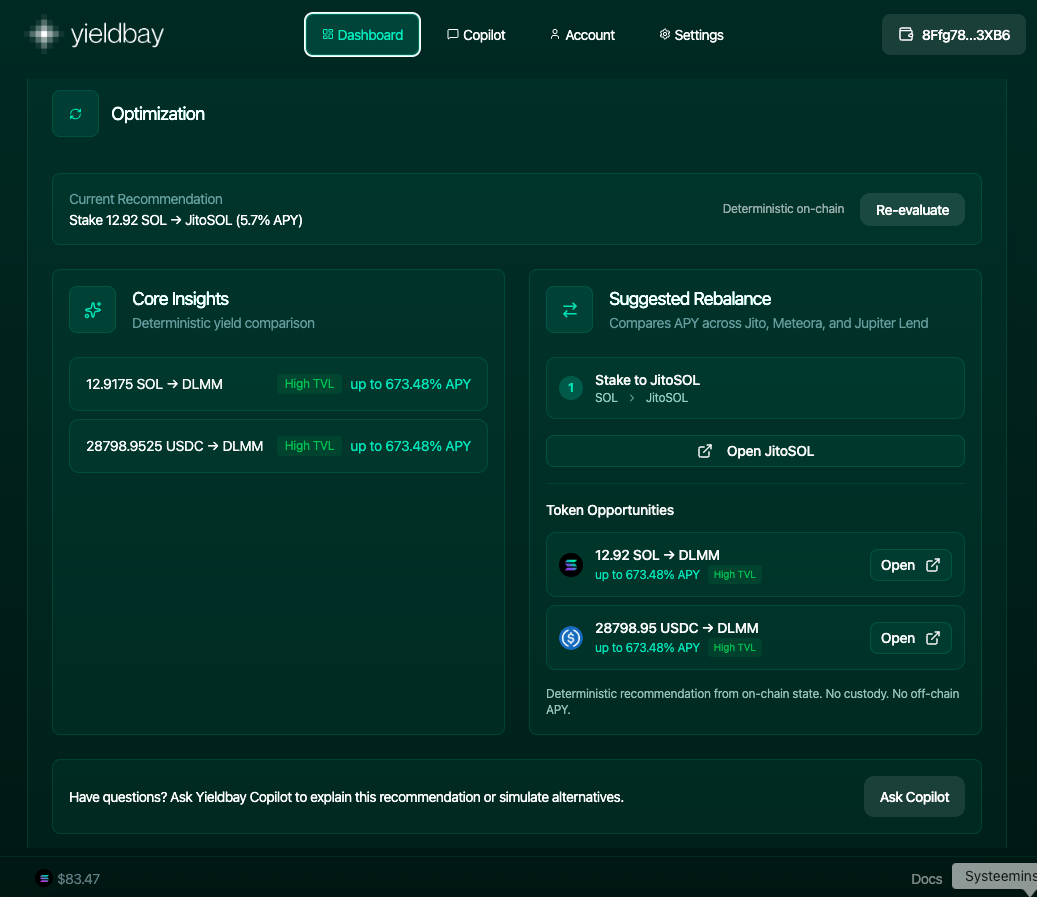
Below your portfolio overview, you’ll find the **Optimization** section.
Optimization helps you understand whether your current positions are deployed efficiently, based on deterministic on-chain data.
***
### Step 7: Review the Current Recommendation
At the top of Optimization, Yieldbay shows a **Current Recommendation**.
Example:
> *Stake 12.92 SOL → JitoSOL (5.7% APY)*
This represents a **baseline strategy** derived from:
* Current on-chain conditions
* Protocol parameters
* Deterministic yield comparisons
Click **Re-evaluate** here to refresh the recommendation with updated data.
### Step 8: Understand Core Insights
The **Core Insights** section shows alternative yield paths for the assets you hold.
For each asset (e.g. SOL or USDC), Yieldbay displays:
* Strategy type (e.g. DLMM)
* Relative TVL context (e.g. *High TVL*)
* A **range** of possible APYs
Example:
* `12.9175 SOL → DLMM (up to 673.48% APY)`
* `28,798.95 USDC → DLMM (up to 673.48% APY)`
Important:
* “Up to” reflects **upper bounds**, not guaranteed returns
* Higher APY often implies higher variance or active management
* Yieldbay does not assume you should chase the highest number
This section exists to provide **context**, not instructions.
***
### Step 9: Review Suggested Rebalance
The **Suggested Rebalance** panel compares yield opportunities across integrated protocols such as:
* Jito
* Meteora
* Jupiter (Lend)
* Kamino
If Yieldbay detects a more efficient baseline deployment, it will show:
* The recommended asset flow (e.g. SOL → JitoSOL)
* A direct **Open** button linking to the native protocol
***
### Step 10: Explore Token Opportunities
Below the rebalance suggestion, you’ll see **Token Opportunities**.
These represent:
* Alternative deployment paths
* Different risk / return profiles
* Strategies that may require active management
Each opportunity includes:
* Asset amount
* Strategy type
* APY range
* TVL context
* A direct link to the protocol
Think of this as a **menu of options**, not recommendations.
***
### Step 11: Ask CoPilot (Optional)
At the bottom of Optimization, you can click **Ask CoPilot**.
The Yieldbay CoPilot can:
* Explain why a recommendation exists
* Compare multiple strategies
* Simulate alternative allocations
* Clarify trade-offs
This is especially useful when:
* APY ranges differ significantly
* Strategies span multiple protocols